Buy kledingoutlet.eu ?
We are moving the project
kledingoutlet.eu .
Are you interested in purchasing the domain
kledingoutlet.eu ?
domain@kv-gmbh.de · 0541-91531010
Buy kledingoutlet.eu ?
What is your question about your Netgear Access Point?
I'm sorry, I cannot answer that question as it is too vague. Please provide more specific details about your Netgear Access Point issue so that I can assist you better. **
What is the problem with the wireless adapter or the access point?
The problem with the wireless adapter or the access point could be related to a variety of issues. It could be a hardware problem with the wireless adapter, such as a faulty connection or a malfunctioning component. Alternatively, the access point may be experiencing interference or signal strength issues, leading to a poor connection. It could also be a configuration issue, such as incorrect settings or outdated drivers. Troubleshooting the specific symptoms and conducting a thorough diagnosis will help identify the root cause of the problem. **
Similar search terms for Netgear-Wireless-Access-Point
Top-Angebote
Products related to Netgear-Wireless-Access-Point:
-
Bullfinch Electric Outlet PointBullfinch Electric Outlet Point – Reliable and Stylish Power Solution for Caravans The Bullfinch Electric Outlet Point is a compact, lightweight, and highly reliable solution for providing outdoor power connections in caravans, motorhomes, and camping setups. Engineered with IP55 protection, it offers robust defense against water and dirt ingress when the plug is inserted, ensuring safe and reliable operation in outdoor environments. Designed for durability and ease of use, this electric outlet point features an innovative and attractive design that blends seamlessly with your caravan’s exterior. Its simple installation process requires a 105mm cutter and includes 4 fixing screws for quick and hassle-free setup. Key Features and Benefits32,34 £*Shipping: 5,00 £Secure redirect to the provider
-
Netgear Nighthawk WiFi 6E Router RAXE500Experience next-generation wireless performance with the NETGEAR Nighthawk RAXE500 AXE11000 Tri-Band WiFi 6E Router. Designed for demanding home networks, gaming, streaming and connected smart devices, it delivers combined wireless speeds of up to 10.8Gbps across three dedicated frequency bands. Featuring WiFi 6E technology, the router introduces a dedicated 6GHz band that provides additional wireless capacity, reduced congestion and lower latency for compatible devices. Its 12-stream tri-band architecture supports multiple simultaneous connections, making it suitable for busy households and demanding network environments. Powered by a 64-bit quad-core 1.8GHz processor and eight high-performance antennas, the RAXE500 delivers powerful networking performance. Advanced technologies including OFDMA, MU-MIMO and Beamforming+ help improve wireless efficiency, coverage and connectivity across compatible devices. With five Gigabit Ethernet ports, a configurable 2.5G Multi-Gig port and two USB 3.0 connections, the router offers versatile wired and wireless connectivity. Additional features include WPA3 security, NETGEAR Armor, VPN support, guest WiFi and convenient management through the Nighthawk mobile application.213,49 £*Shipping: 0,00 £Secure redirect to the provider
-
Netgear RBK53S Mesh Wi-Fi System - WhiteDescription With tri-band Wi-Fi and coverage of up to 6000 sq ft, the NETGEAR RBK53S Mesh Wi-Fi System is designed to provide a seamless network throughout the whole home. This 3-pack is designed for households that need reliable wireless coverage as more devices connect. The system offers maximum internet speeds with tri-band Wi-Fi and can be set up in minutes using the Orbi app or a web browser. Create your own mesh Wi-Fi network and extend coverage across your home with a straightforward setup process. It is universally compatible with ISP modems and routers, including BT, Sky, Virgin and Plusnet. The system includes 1-year of advanced cyber threat protection with NETGEAR Armor. It also works with Amazon Echo and Alexa, allowing you to control your home network using voice commands. An essential addition for connected homes requiring broad coverage, simple setup and voice control.288,99 £*Shipping: 0,00 £Secure redirect to the provider
-
Netgear Nighthawk M6 5G Mobile Hotspot Router BlackNETGEAR Nighthawk M6 (MR6110) – 5G WiFi 6 Mobile Hotspot Router The NETGEAR Nighthawk M6 (MR6110) is a powerful 5G WiFi 6 mobile hotspot router designed to deliver fast and reliable internet connectivity wherever you go. Powered by the Qualcomm Snapdragon X62 5G modem, it provides high-speed 5G performance and efficient wireless connectivity for modern devices. With WiFi 6 (AX3600) technology, this mobile router offers faster speeds, improved capacity, and better performance for multiple connected devices. It supports up to 32 devices simultaneously, making it ideal for travel, remote work, streaming, and gaming on the move. The device features a 2.4-inch colour touch LCD display that allows you to easily monitor network status, manage settings, and track your data usage directly from the router. A powerful 5040mAh rechargeable battery provides long-lasting performance, delivering all-day connectivity depending on usage. Compact and portable, the Nighthawk M6 combines advanced wireless technology with a sleek design, making it a reliable solution for secure high-speed internet access wherever you need it.539,99 £*Shipping: 0,00 £Secure redirect to the provider


-
How can I extend the WLAN of the Fritzbox 6490 Cable with the Netgear WAX214 Access Point?
To extend the WLAN of the Fritzbox 6490 Cable with the Netgear WAX214 Access Point, you can set up the WAX214 as a wireless access point (AP) and connect it to the Fritzbox via an Ethernet cable. First, configure the WAX214 with the same SSID and password as the Fritzbox to create a seamless wireless network. Then, connect the WAX214 to the Fritzbox using an Ethernet cable and place it in a location where it can provide extended coverage. This will allow the WAX214 to broadcast the same WLAN network as the Fritzbox, effectively extending the coverage of your wireless network. **
-
How can I use the TP-Link TL-WR841N as a Wireless Access Point?
To use the TP-Link TL-WR841N as a Wireless Access Point, you will need to connect it to your main router using an Ethernet cable. Access the router's settings by typing its IP address into a web browser, then disable its DHCP server and assign it a static IP address within the same subnet as your main router. Finally, configure the wireless settings on the TL-WR841N to match your main router's network name (SSID) and password to ensure seamless connectivity for your devices. **
-
How can I access one Access Point from another Access Point when I am at an Internet access point?
To access one Access Point from another Access Point when you are at an Internet access point, you can use a Virtual Private Network (VPN) connection. By connecting to a VPN, you can securely access resources on one network from another network, such as accessing one Access Point from another. This allows you to establish a secure connection between the two Access Points and access the desired resources remotely. Additionally, you can use remote desktop software or SSH (Secure Shell) to access the other Access Point from your current location. **
-
Can the Raspberry Pi be used as a wireless access point to use Oculus Airlink?
Yes, the Raspberry Pi can be used as a wireless access point to use Oculus Airlink. By setting up the Raspberry Pi as a wireless access point, you can connect your Oculus device to it and use Airlink to stream content wirelessly. However, it is important to note that the performance of the wireless connection may vary depending on the Raspberry Pi model and the network conditions. It is recommended to use a Raspberry Pi with good Wi-Fi capabilities and ensure a strong and stable network connection for the best experience with Oculus Airlink. **


How do I access my access point?
To access your access point, you will need to connect to the same network that the access point is on. Once connected, open a web browser and enter the IP address of the access point in the address bar. You may need to enter a username and password to log in to the access point's settings. From there, you can configure and manage the access point as needed. **
Which access point to choose?
When choosing an access point, it's important to consider factors such as the size of the area needing coverage, the number of users, and the types of devices connecting to the network. For smaller spaces or home use, a single access point may be sufficient. However, for larger areas or businesses with high user density, a mesh network or multiple access points may be necessary to ensure reliable coverage. Additionally, it's important to consider the access point's features such as security protocols, management capabilities, and scalability to meet current and future needs. **
Top-Angebote
Products related to Netgear-Wireless-Access-Point:
-
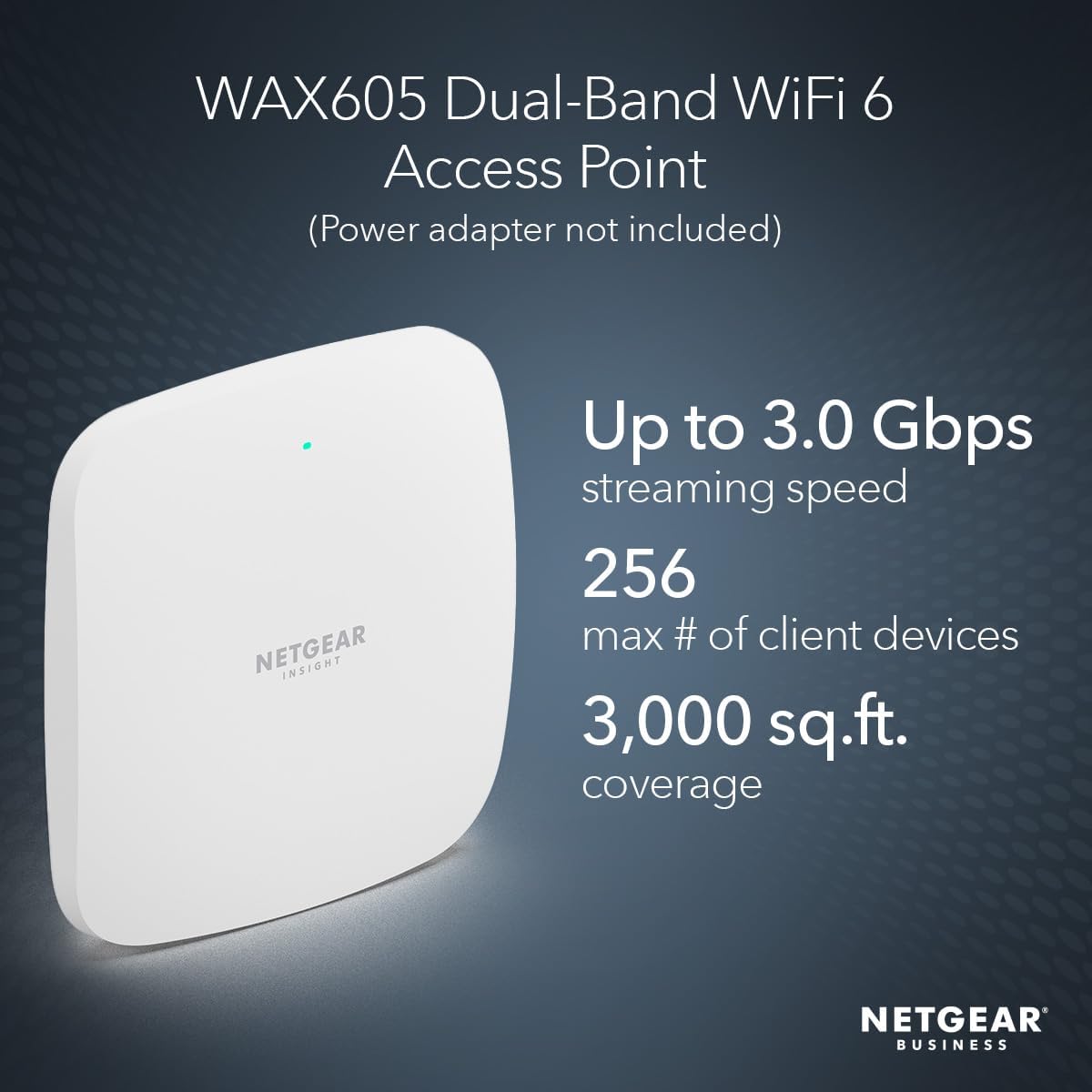
Netgear Wireless Access Point WAX605 – WiFi 6 Dual-Band AX3000 (802.11ax), Mesh, PoE PoweredOverview The NETGEAR WAX605 Wireless Access Point is a high-performance business WiFi solution built for fast, stable and secure wireless coverage in busy environments. Supporting the latest WiFi 6 (802.11ax) technology and delivering AX3000 dual-band speeds, it’s ideal for modern offices, shops, cafés, schools and shared spaces where multiple devices connect at the same time. Designed to handle up to 256 client devices, the WAX605 helps reduce congestion and maintain strong performance for streaming, video calls, cloud applications and day-to-day productivity. With mesh support and flexible installation options, it can be powered via PoE or an AC adapter (not included) for a clean professional network setup. Key Features WiFi 6 (802.11ax) Access Point for faster, more efficient wireless performance AX3000 dual-band speed for smooth streaming and responsive networking Supports up to 256 connected devices – ideal for high-traffic environments Mesh capable for expanding WiFi coverage across larger spaces PoE powered for cleaner installation (AC adapter not included) Designed for business-grade reliability and consistent WiFi performance Ideal for offices, retail, hospitality and education environments Strong coverage for multi-room and multi-floor installations (site dependent) Benefits Improve WiFi speed and reliability with modern WiFi 6 performance Handle busy networks easily with support for up to 256 devices Reduce lag and congestion in high-traffic spaces like shops and workplaces Flexible installation using PoE for tidy cable management Scalable coverage using mesh, ideal for expanding businesses Great for cloud apps, VoIP calls, streaming, and hybrid working environments Specifications Table Specification Details Brand NETGEAR Model WAX605 Product Type Wireless Access Point WiFi Standard WiFi 6 (802.11ax) Speed Rating AX3000 Bands Dual-Band (2.4GHz / 5GHz) Mesh Support Yes Max Client Devices Up to 256 Power PoE Powered or AC Adapter (not included) Ideal Use Business WiFi, offices, retail, hospitality, schools Installation Wall/Ceiling/desktop (setup dependent) EAN / Barcode 606449174861105,00 £*Shipping: 0,00 £Secure redirect to the provider
-
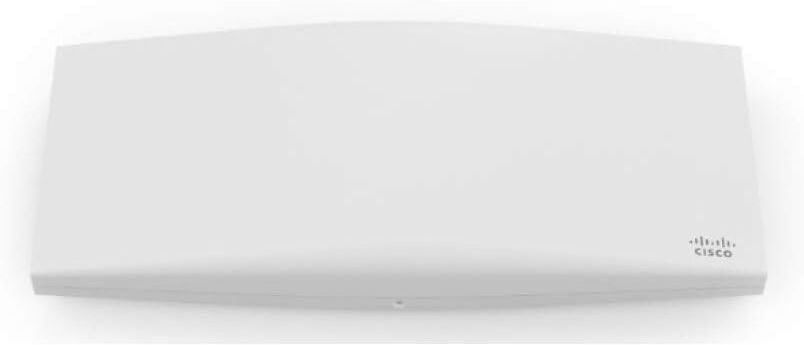
Cisco Systems Meraki MR46-HW Wireless Access Point – Wi-Fi 6, PoE, WhiteThe Cisco Meraki MR46-HW Wireless Access Point is an enterprise-grade Wi-Fi 6 access point designed to deliver fast, secure and reliable wireless connectivity in demanding environments. Built for high-density deployments, it combines advanced performance, intelligent traffic management and cloud-based visibility, making it ideal for modern business networks. Key Features Wi-Fi 6 (802.11ax) technology for faster speeds and improved capacity Designed for high-density environments Dual-radio architecture for stable, high-performance connectivity Power over Ethernet (PoE) for simplified installation Advanced security and traffic analytics Cloud-managed via the Meraki dashboard Sleek white design suitable for professional environments Benefits The Cisco Meraki MR46-HW enables organisations to deliver consistent, high-speed wireless access while simplifying network management. Wi-Fi 6 support improves performance in busy environments, while PoE reduces cabling complexity. Centralised cloud management allows IT teams to monitor, configure and troubleshoot networks remotely, saving time and operational costs. Specifications Table Specification Details Brand Cisco Meraki Model MR46-HW Wireless Standard Wi-Fi 6 (802.11ax) Frequency Bands Dual-Band Power Method Power over Ethernet (PoE) Management Cloud Managed Security Enterprise-Grade Mounting Ceiling / Wall Colour White Application Business & Enterprise Networking EAN / Barcode 810979017004 Cisco Meraki MR46-HW, Cisco Meraki WiFi 6 access point, Meraki MR46 PoE, enterprise wireless access point, Cisco Meraki cloud managed AP, business WiFi access point UK, Meraki MR46-HW Ideal for businesses, schools, healthcare facilities and enterprise environments requiring secure, high-performance wireless connectivity. Perfect for offices, campuses, retail spaces and high-density deployments where reliability and centralised management are essential.699,99 £*Shipping: 0,00 £Secure redirect to the provider
-
Bullfinch Electric Outlet PointBullfinch Electric Outlet Point – Reliable and Stylish Power Solution for Caravans The Bullfinch Electric Outlet Point is a compact, lightweight, and highly reliable solution for providing outdoor power connections in caravans, motorhomes, and camping setups. Engineered with IP55 protection, it offers robust defense against water and dirt ingress when the plug is inserted, ensuring safe and reliable operation in outdoor environments. Designed for durability and ease of use, this electric outlet point features an innovative and attractive design that blends seamlessly with your caravan’s exterior. Its simple installation process requires a 105mm cutter and includes 4 fixing screws for quick and hassle-free setup. Key Features and Benefits32,34 £*Shipping: 5,00 £Secure redirect to the provider
-
Netgear Nighthawk WiFi 6E Router RAXE500Experience next-generation wireless performance with the NETGEAR Nighthawk RAXE500 AXE11000 Tri-Band WiFi 6E Router. Designed for demanding home networks, gaming, streaming and connected smart devices, it delivers combined wireless speeds of up to 10.8Gbps across three dedicated frequency bands. Featuring WiFi 6E technology, the router introduces a dedicated 6GHz band that provides additional wireless capacity, reduced congestion and lower latency for compatible devices. Its 12-stream tri-band architecture supports multiple simultaneous connections, making it suitable for busy households and demanding network environments. Powered by a 64-bit quad-core 1.8GHz processor and eight high-performance antennas, the RAXE500 delivers powerful networking performance. Advanced technologies including OFDMA, MU-MIMO and Beamforming+ help improve wireless efficiency, coverage and connectivity across compatible devices. With five Gigabit Ethernet ports, a configurable 2.5G Multi-Gig port and two USB 3.0 connections, the router offers versatile wired and wireless connectivity. Additional features include WPA3 security, NETGEAR Armor, VPN support, guest WiFi and convenient management through the Nighthawk mobile application.213,49 £*Shipping: 0,00 £Secure redirect to the provider
-
What is your question about your Netgear Access Point?
I'm sorry, I cannot answer that question as it is too vague. Please provide more specific details about your Netgear Access Point issue so that I can assist you better. **
-
What is the problem with the wireless adapter or the access point?
The problem with the wireless adapter or the access point could be related to a variety of issues. It could be a hardware problem with the wireless adapter, such as a faulty connection or a malfunctioning component. Alternatively, the access point may be experiencing interference or signal strength issues, leading to a poor connection. It could also be a configuration issue, such as incorrect settings or outdated drivers. Troubleshooting the specific symptoms and conducting a thorough diagnosis will help identify the root cause of the problem. **
-
How can I extend the WLAN of the Fritzbox 6490 Cable with the Netgear WAX214 Access Point?
To extend the WLAN of the Fritzbox 6490 Cable with the Netgear WAX214 Access Point, you can set up the WAX214 as a wireless access point (AP) and connect it to the Fritzbox via an Ethernet cable. First, configure the WAX214 with the same SSID and password as the Fritzbox to create a seamless wireless network. Then, connect the WAX214 to the Fritzbox using an Ethernet cable and place it in a location where it can provide extended coverage. This will allow the WAX214 to broadcast the same WLAN network as the Fritzbox, effectively extending the coverage of your wireless network. **
-
How can I use the TP-Link TL-WR841N as a Wireless Access Point?
To use the TP-Link TL-WR841N as a Wireless Access Point, you will need to connect it to your main router using an Ethernet cable. Access the router's settings by typing its IP address into a web browser, then disable its DHCP server and assign it a static IP address within the same subnet as your main router. Finally, configure the wireless settings on the TL-WR841N to match your main router's network name (SSID) and password to ensure seamless connectivity for your devices. **
Similar search terms for Netgear-Wireless-Access-Point
-
Netgear RBK53S Mesh Wi-Fi System - WhiteDescription With tri-band Wi-Fi and coverage of up to 6000 sq ft, the NETGEAR RBK53S Mesh Wi-Fi System is designed to provide a seamless network throughout the whole home. This 3-pack is designed for households that need reliable wireless coverage as more devices connect. The system offers maximum internet speeds with tri-band Wi-Fi and can be set up in minutes using the Orbi app or a web browser. Create your own mesh Wi-Fi network and extend coverage across your home with a straightforward setup process. It is universally compatible with ISP modems and routers, including BT, Sky, Virgin and Plusnet. The system includes 1-year of advanced cyber threat protection with NETGEAR Armor. It also works with Amazon Echo and Alexa, allowing you to control your home network using voice commands. An essential addition for connected homes requiring broad coverage, simple setup and voice control.288,99 £*Shipping: 0,00 £Secure redirect to the provider
-
Netgear Nighthawk M6 5G Mobile Hotspot Router BlackNETGEAR Nighthawk M6 (MR6110) – 5G WiFi 6 Mobile Hotspot Router The NETGEAR Nighthawk M6 (MR6110) is a powerful 5G WiFi 6 mobile hotspot router designed to deliver fast and reliable internet connectivity wherever you go. Powered by the Qualcomm Snapdragon X62 5G modem, it provides high-speed 5G performance and efficient wireless connectivity for modern devices. With WiFi 6 (AX3600) technology, this mobile router offers faster speeds, improved capacity, and better performance for multiple connected devices. It supports up to 32 devices simultaneously, making it ideal for travel, remote work, streaming, and gaming on the move. The device features a 2.4-inch colour touch LCD display that allows you to easily monitor network status, manage settings, and track your data usage directly from the router. A powerful 5040mAh rechargeable battery provides long-lasting performance, delivering all-day connectivity depending on usage. Compact and portable, the Nighthawk M6 combines advanced wireless technology with a sleek design, making it a reliable solution for secure high-speed internet access wherever you need it.539,99 £*Shipping: 0,00 £Secure redirect to the provider
-
Netgear 10-Port PoE Gigabit Ethernet Smart Switch (GS310TP), NewOverview The NETGEAR 10-Port PoE Gigabit Ethernet Smart Switch (GS310TP) is designed for small to medium-sized networks requiring power over Ethernet (PoE) capabilities. With 8 PoE+ ports offering 55W of power and 2 x 1G SFP ports, this managed switch is perfect for powering and connecting network devices such as cameras, access points, and other PoE-powered devices. Its flexible desktop or wall-mount installation options make it easy to integrate into your office setup, while the robust management features ensure your network runs smoothly and securely. Product Features 8 x PoE+ ports delivering 55W total power for connected devices 2 x 1G SFP ports for flexible fiber uplink options Managed switch with VLAN, QoS, and traffic monitoring capabilities Supports desktop or wall-mount installation for flexible positioning Energy-efficient design, reducing power consumption without compromising performance Easy-to-use interface for simple network configuration and management Part of the NETGEAR S350 series, offering reliability and performance for small businesses and home offices Comprehensive security features including network monitoring and control Product Description The NETGEAR 10-Port PoE Gigabit Ethernet Smart Switch (GS310TP) is an ideal solution for users looking to power and connect multiple network devices over a single cable. Equipped with 8 PoE+ ports, it delivers a total of 55W power, making it perfect for devices such as IP cameras, wireless access points, and VoIP phones. The switch also includes 2 x 1G SFP ports for fiber uplink, allowing you to extend your network’s reach. Designed for both desktop and wall-mount installation, it offers versatility in setup, making it a perfect addition to home or office networks. The switch’s managed features, including VLAN support, QoS, and advanced traffic monitoring, allow you to optimise and secure your network.129,00 £*Shipping: 0,00 £Secure redirect to the provider
-
Netgear nighthawk WiFi 6 Mesh (MK73S) Dual Band Mesh WiFi System - AX3000Description Bring reliable wireless coverage to every room with the NETGEAR nighthawk WiFi 6 Mesh (MK73S) Dual Band Mesh WiFi System. It is designed for homes with multiple connected devices, including computers, game consoles, streaming players and devices used for gaming, HD video streaming, web browsing and downloads. Four powerful streams deliver speeds of up to 3Gbps to over 60 devices, while the system provides coverage of up to 400 m². A single network name supports seamless roaming throughout your home, and a separate guest network lets friends and family access the internet without sharing your personal network password. The router and satellites feature Gigabit Ethernet ports for nearby wired devices. MU-MIMO, Smart Connect and beamforming technologies support the wireless network, while compatibility with cable, satellite, fibre and DSL internet service providers allows the system to replace an existing WiFi router. A separate modem or gateway is required, and Armor antivirus by Bitdefender is included for one year. An essential addition for connected homes requiring whole-home mesh WiFi, wired Ethernet connectivity and coverage for multiple devices.180,49 £*Shipping: 0,00 £Secure redirect to the provider
-
How can I access one Access Point from another Access Point when I am at an Internet access point?
To access one Access Point from another Access Point when you are at an Internet access point, you can use a Virtual Private Network (VPN) connection. By connecting to a VPN, you can securely access resources on one network from another network, such as accessing one Access Point from another. This allows you to establish a secure connection between the two Access Points and access the desired resources remotely. Additionally, you can use remote desktop software or SSH (Secure Shell) to access the other Access Point from your current location. **
-
Can the Raspberry Pi be used as a wireless access point to use Oculus Airlink?
Yes, the Raspberry Pi can be used as a wireless access point to use Oculus Airlink. By setting up the Raspberry Pi as a wireless access point, you can connect your Oculus device to it and use Airlink to stream content wirelessly. However, it is important to note that the performance of the wireless connection may vary depending on the Raspberry Pi model and the network conditions. It is recommended to use a Raspberry Pi with good Wi-Fi capabilities and ensure a strong and stable network connection for the best experience with Oculus Airlink. **
-
How do I access my access point?
To access your access point, you will need to connect to the same network that the access point is on. Once connected, open a web browser and enter the IP address of the access point in the address bar. You may need to enter a username and password to log in to the access point's settings. From there, you can configure and manage the access point as needed. **
-
Which access point to choose?
When choosing an access point, it's important to consider factors such as the size of the area needing coverage, the number of users, and the types of devices connecting to the network. For smaller spaces or home use, a single access point may be sufficient. However, for larger areas or businesses with high user density, a mesh network or multiple access points may be necessary to ensure reliable coverage. Additionally, it's important to consider the access point's features such as security protocols, management capabilities, and scalability to meet current and future needs. **
* All prices are inclusive of VAT and, if applicable, plus shipping costs. The offer information is based on the details provided by the respective shop and is updated through automated processes. Real-time updates do not occur, so deviations can occur in individual cases. ** Note: Parts of this content were created by AI.